How to Use Surfshark Kill Switch: Step-By-Step
Surfshark Kill Switch is a very helpful feature for those who wish to secure their online privacy. Learn how to enable it on your device.
Staying safe online is very important. When using a VPN like Surfshark with Netflix, you want to make sure your internet traffic is always private.
But like any piece of software, VPN connections aren’t always perfect. A server can drop unexpectedly, your Wi-Fi signal can weaken, or the app may briefly disconnect while switching locations.
The problem is that even a short interruption can expose your real IP address and reveal your actual location before the VPN reconnects.
Most users never notice these split-second disconnects, but they can still compromise the privacy a VPN is supposed to provide.
That’s exactly why Surfshark includes a Kill Switch feature. Think of it as a safety net for your VPN connection. If Surfshark disconnects unexpectedly, the Kill Switch immediately blocks internet access until the secure connection is restored.
How Does Surfshark Kill Switch Work
The Kill Switch is like a safety button. It watches your VPN connection all the time. If the VPN drops, the Kill Switch turns off your internet connection immediately.
This protects your IP address and online activity.
Once the VPN connects again, the internet access is restored. It’s automatic and very useful for people who care about privacy.
There are two types of Kill Switches in general:
- Soft Kill Switch: Blocks only selected apps or traffic.
- Hard Kill Switch: Stops all internet activity until the VPN reconnects.
Surfshark offers a hard Kill Switch. It blocks all internet traffic if your VPN connection is lost. That gives you full protection.
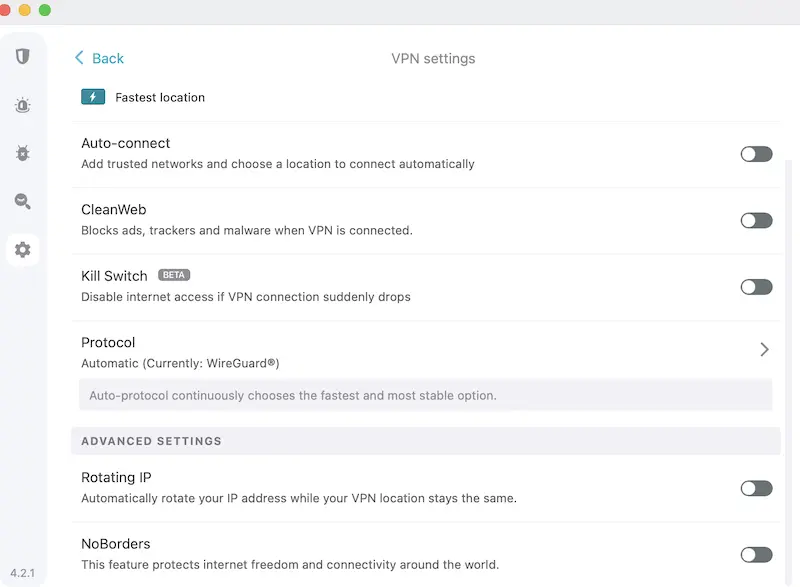
How to Enable Surfshark Kill Switch From App
Turning on the Surfshark Kill Switch is simple. You can do it in just a few steps.
On Windows:
- Open the Surfshark app.
- Click the gear icon (Settings).
- Go to the “Connectivity” tab.
- Find the Kill Switch option.
- Toggle it ON.
On macOS:
- Open the Surfshark app.
- Click on the gear icon.
- Go to “Connectivity.”
- Enable the Kill Switch by switching it ON.
On Android:
- Open the Surfshark app.
- Tap the gear icon.
- Go to “VPN Settings.”
- Tap “Kill Switch.”
- Toggle it ON.
Note: You may also need to give app permissions for the Kill Switch to work.
On iOS:
Surfshark does not offer a Kill Switch in the iOS app due to Apple’s system limits. However, iOS has its own built-in system-based VPN protection.
On Linux:
Kill Switch is not available directly in the Linux Surfshark app, but you can set up firewall rules or use scripts as a workaround.
Benefits of Using a VPN Kill Switch
The Kill Switch feature in Surfshark offers many important benefits that help keep your online activity private and secure. Here’s a closer look at why using it is a smart choice:
1. Protects Your IP Address
When your VPN connection suddenly drops, your real IP address can be exposed. The Kill Switch stops this from happening by cutting off your internet until the VPN reconnects.
This is crucial when you’re accessing content from restricted regions or using public Wi-Fi.
2. Keeps Your Online Activities Private
Whether you’re browsing, torrenting, or accessing sensitive information, your data stays safe.
With the Kill Switch turned on, there’s no risk of your internet provider, hackers, or third parties seeing what you’re doing online during a connection drop.
3. Prevents DNS and Data Leaks
Without a Kill Switch, a sudden VPN disconnection could cause DNS requests or traffic to leak through your regular network. This can happen in seconds without you noticing.
The Kill Switch prevents that by immediately blocking all outgoing traffic until the VPN is active again.
4. Useful for Streaming and Bypassing Geo-Blocks
When you’re streaming content from services like Netflix or Hulu with a VPN, a connection drop can reveal your true location and get your session blocked.
A Kill Switch ensures your connection stays encrypted and secure, so you don’t lose access or face account restrictions.
5. Ideal for Torrenting Safely
Torrent users often rely on VPNs to stay anonymous. If the VPN disconnects, your IP can be exposed to other peers in the torrent swarm.
Surfshark’s Kill Switch prevents this by halting the traffic until your encrypted tunnel is restored.
6. Peace of Mind for Remote Workers
If you’re working with confidential data from remote locations or using open networks, a Kill Switch gives you added peace of mind.
It acts as a safety net that protects sensitive company information if the VPN fails for any reason.
7. Reliable for Countries with Strong Censorship
In countries where VPN use is monitored or restricted, sudden exposure of your real IP can be risky. Surfshark’s Kill Switch helps prevent accidental leaks, ensuring your anonymity and helping you stay under the radar.
Cons of Using a Kill Switch
While Kill Switch is helpful, it has a few downsides.
- Stops All Internet Access: When the VPN drops, the internet stops. This can interrupt downloads, streaming, or online work.
- May Block Access by Mistake: Sometimes, the Kill Switch may activate even when the VPN is working fine. This can be annoying.
- Not Available on All Devices: Surfshark Kill Switch is not available on iOS or Linux officially. That limits its use for some people.
Uses of Surfshark Kill Switch
The Kill Switch can help in many online activities. Let’s take a look:
1. Streaming
When streaming content from other countries using Surfshark, a VPN drop could expose your location. Kill Switch prevents your streaming service from knowing your real IP. This means fewer errors and uninterrupted access.
For example, if you are streaming Netflix with Surfshark and your IP is accidentally exposed, you won’t be able to change your Netflix library. Or, you could get a proxy error message.
2. Gaming
Gamers often use VPNs for better ping or regional access. If the VPN fails mid-game, the Kill Switch stops all traffic. This keeps you safe from DDoS attacks or sudden lags due to IP leaks.
3. Torrenting
One of the best uses of the Kill Switch. It ensures that none of your torrenting traffic leaks if the VPN disconnects. This keeps your identity protected.
4. Private Browsing
Even if you’re just browsing, your real IP can get logged by websites if the VPN drops. The Kill Switch makes sure that doesn’t happen.
5. Remote Work
If you’re using a VPN for office access, Kill Switch ensures no company data leaks when the VPN disconnects. It’s very useful for secure work-from-home setups.
FAQs
Does Surfshark VPN have a kill switch?
Yes, Surfshark has a built-in Kill Switch feature. It is available on Windows, macOS, and Android apps. The feature blocks all internet traffic if the VPN connection drops unexpectedly.
Which VPN has the best kill switch?
Several VPNs offer kill switch features. Surfshark is the best VPN with a reliable kill switch feature. Surfshark’s kill switch is easy to use and effective.
It works quickly and protects your IP without needing extra setup.
How do you know if a VPN kill switch is working?
You can test the Kill Switch by following these steps:
- Turn on Surfshark VPN and enable Kill Switch.
- Disconnect your internet or shut down the VPN.
- Try to visit a website.
- If the page does not load, the Kill Switch is working.
You can also check your IP online before and after. If your real IP does not appear during the drop, the Kill Switch is active.
Conclusion
The Surfshark Kill Switch is one of those features you hope you never need but will be glad to have when a VPN connection drops unexpectedly.
By blocking the internet access during a disconnect, Surfshark helps prevent your real IP address and online activity from being exposed.
While it may briefly interrupt your connection, that small inconvenience is a worthwhile trade-off for stronger privacy and security.
If you use Surfshark regularly for streaming, browsing, gaming, or remote work, enabling the Kill Switch is a simple step that adds an extra layer of protection and keeps your data secure when it matters most.